In this article
Compare Spanish translation tools for business meetings, travel, documents, customer support, learning, and regional Spanish. Covers VoicePing, Google Translate, DeepL, Microsoft Translator, Apple Translate, SpanishDict, WordReference, Reverso, Linguee, and travel apps.
Last updated: April 26, 2026.
Spanish translation is not one use case. A sales call with a customer in Mexico, a supplier audit in Spain, a menu in Colombia, a legal intake form in California, and a student checking the difference between por and para all need different tools.
The market is also changing quickly. Google, Microsoft, Apple, DeepL, and business meeting tools now cover text, camera OCR, voice, offline packs, and live captions in different combinations. The best choice is usually a stack: one meeting tool, one mobile travel app, one writing translator, and one dictionary or context tool for nuance.
This guide separates researched feature facts from VoicePing’s product opinion. We cite vendor documentation where the claim depends on current product support, and we avoid stale monthly prices because app plans change often.
Quick Recommendations
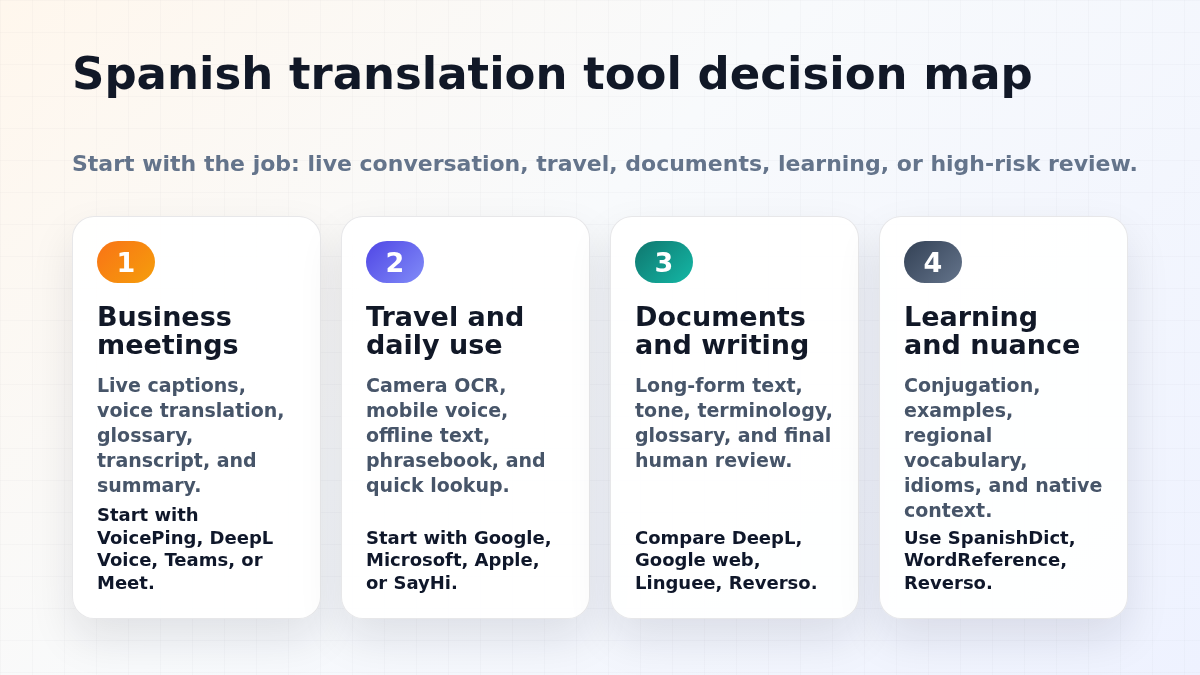
| Job to be done | Start with | Why |
|---|---|---|
| Spanish business meetings | VoicePing , DeepL Voice, or your web conferencing stack | Live captions, transcript, summary, glossary, and post-meeting review matter more than one-off phrase translation. |
| Travel and daily lookup | Google Translate , Microsoft Translator , or Apple Translate | Camera OCR, speech, phrasebook, and offline text support help in airports, hotels, restaurants, and taxis. |
| Documents and polished writing | DeepL Translator , Google Translate web, Linguee, Reverso | Longer text needs tone control, context examples, terminology checks, and human review before publication. |
| Learning and nuance | SpanishDict , WordReference , Reverso Context | Dictionary entries, conjugation tables, forums, and real usage examples catch mistakes machine translation may hide. |
| Legal, medical, HR, or contracts | Certified human translator or interpreter, with AI only for draft preparation | Risk is tied to liability, consent, and exact wording. Do not rely on an app alone. |
What Changed Since Older Spanish App Lists
Older Spanish translation app articles often ranked tools by app-store rating or listed “17 best apps” without explaining the actual workflow. That is weak advice in 2026.
Three changes matter most:
- Voice translation moved into meetings. A two-person travel conversation is different from a Zoom call with five speakers, shared slides, action items, and compliance requirements.
- Regional Spanish support is improving, but still not magic. DeepL documents that Spanish can be selected as European Spanish or Latin American Spanish as a target language, while Latin American Spanish is a more neutral style rather than a country-specific variety.
- Offline support is feature-specific. Google says downloaded languages can be used without internet and may support camera translation. Microsoft says offline packs support text, camera, phrasebooks, and pinned translations, but not live speech conversations. Apple says offline translation requires downloaded input and output languages and notes that offline translations may be less accurate than online translations.
The practical takeaway: choose the tool by task, not by a generic “accuracy” ranking.
How to Evaluate Spanish Translation Tools
Use this checklist before choosing a tool for work.
| Evaluation area | What to check |
|---|---|
| Mode | Text, camera, speech, live meeting captions, document upload, or website translation. |
| Region | Spain, Mexico, US Spanish, neutral Latin American Spanish, or a specific local market. |
| Tone | Formal usted, informal tu, plural ustedes or vosotros, and industry-specific politeness. |
| Audio quality | Microphone, background noise, overlapping speakers, accents, and speaker separation. |
| Terminology | Glossaries for product names, legal terms, medical terms, customer names, and acronyms. |
| Security | Data retention, admin controls, enterprise plan terms, and whether sensitive content is allowed. |
| Offline behavior | Whether offline mode covers text only, camera OCR, phrasebook, or voice. |
| Review path | Who approves the final Spanish before a customer, patient, regulator, or court sees it. |
Best Spanish Translation Tools by Use Case
1. VoicePing for Spanish Business Meetings
VoicePing is the right fit when the output is not just a translated sentence, but a usable business record: live interpretation, transcript, meeting summary, and follow-up review. VoicePing’s site lists real-time voice translation, transcription, and AI meeting summarization, and its product pages list Spanish among supported translation languages.
Use VoicePing for:
- Spanish-English recurring meetings with customers, distributors, or overseas teams.
- Sales calls where the transcript and summary need to be reviewed later.
- Events or hybrid seminars where attendees need captions without installing a complex interpreter setup.
- Internal teams that need translation, minutes, and business context in the same workflow.
Product opinion: VoicePing is strongest when a team needs searchable meeting output and business continuity, not only travel phrases. For casual travel, a mobile app is usually faster.
2. Google Translate for Travel, Camera OCR, and Fast Lookup
Google Translate remains the default Spanish travel tool because it combines camera translation, conversation mode, speech input, handwriting, saved phrases, document translation, and website translation. Google’s help documentation also explains that downloaded languages can be used without an internet connection, and downloaded languages may support camera translation.
Use it for:
- Menus, signs, kiosks, immigration forms, and taxi instructions.
- Quick Spanish-English or English-Spanish phrases.
- Offline text preparation before a trip.
- Webpage and document translation when the material is low risk.
Limitations: do not assume every mode works offline in every situation. Test the exact language pair, device, and mode before you rely on it in a venue, airport, clinic, or customer visit.
3. DeepL for Spanish Documents and Polished Writing
DeepL Translator is often a strong option for long-form Spanish writing because it focuses on fluent output and language variants. DeepL’s current help page says Spanish is supported, Spanish can be a source language without variety distinction, and Spanish target output can be European Spanish or Latin American Spanish. It also notes Latin American Spanish output is a general neutral style, not a specific country variety.
Use it for:
- Business emails, proposals, landing pages, help-center drafts, and internal documents.
- Comparing European Spanish and Latin American Spanish target output.
- Creating a first draft for human review.
- Maintaining more consistent tone than ad hoc sentence-by-sentence translation.
For meetings, DeepL Voice documents Spanish as a supported spoken language for meetings. Compare it with VoicePing if your main use case is live captions and meeting translation rather than document writing.
4. Microsoft Translator for Microsoft-Centric Teams and Offline Text
Microsoft Translator is useful when your team already lives in Microsoft workflows or needs a free mobile translator with offline text support. Microsoft’s Android FAQ says offline language packs support text translation, camera translation, phrasebooks, and pinned translations. It also says live speech conversations and microphone translation are not available offline.
Use it for:
- Corporate users who already trust Microsoft accounts and security posture.
- Offline text and photo translation after downloading the language pair.
- Phrasebook-driven travel or frontline support.
- A backup app when Google Translate is not available or a user prefers Microsoft.
The key planning detail is offline speech. If you need spoken Spanish without connectivity, test the workflow in advance and consider a dedicated interpreter setup.
5. Apple Translate for iPhone-First Users
Apple Translate is convenient because it is built into iPhone workflows. Apple’s current support page says users can download languages, use On-Device Mode, and choose a default translation app. It also states that both input and output languages must be downloaded for offline translation, and offline translations may be less accurate than online translations.
Use it for:
- iPhone users who want simple text or conversation translation without adding another app.
- Privacy-sensitive situations where on-device mode is preferred and supported.
- Quick travel phrases when the language pair and offline mode have already been tested.
Limitations: Apple Translate is convenient, but it is not the broadest multilingual workbench. For camera-heavy travel, document workflows, or business meeting records, compare it with Google, Microsoft, DeepL, or VoicePing.
6. SpanishDict for Learners and Grammar Checks
SpanishDict is a better companion than a generic translator when you are learning Spanish or editing your own Spanish. It is especially useful for conjugations, example sentences, pronunciation, and word-level nuance.
Use it for:
- Choosing between similar words.
- Checking verb conjugations before sending a message.
- Understanding why a translation uses a specific preposition or tense.
- Learning regional vocabulary differences instead of memorizing one phrase.
7. WordReference for Dictionary Depth and Native-Speaker Context
WordReference remains useful for bilingual dictionary lookup, forums, conjugation, and edge cases that machine translation may smooth over. It is a strong second opinion when the Spanish sentence is short but the meaning is sensitive.
Use it for:
- Idioms, phrasal expressions, and words with multiple translations.
- Checking whether a term sounds natural in Spain or Latin America.
- Reading forum discussions where native speakers explain usage.
- Editing titles, UI labels, and support messages where one word matters.
8. Reverso Context for Phrases and Idioms
Reverso Context shows phrase-level examples from bilingual context. This is helpful when a literal Spanish translation is grammatically correct but awkward.
Use it for:
- Idioms, collocations, and business phrases.
- Comparing how a term appears in real sentences.
- Checking tone before using a translated phrase in email or chat.
- Learning how short expressions change across contexts.
9. Linguee for Bilingual Examples
Linguee is useful when you need examples from bilingual documents and dictionary-style entries. It is not a replacement for final human review, but it helps writers see how a term has been translated in comparable materials.
Use it for:
- Product documentation and business terminology research.
- Finding alternate translations for a phrase.
- Checking whether a Spanish term appears in formal document contexts.
- Comparing machine output against examples before final editing.
10. SayHi, iTranslate, and Travel-Focused Apps
Travel-first apps can still be useful for simple Spanish conversation, especially when the interface is faster for voice exchange than a full work tool. Treat them as convenience tools, not authoritative translation systems.
Use them for:
- Asking directions, ordering food, and confirming times.
- A backup voice interface when another app feels too slow.
- Personal travel where a polished transcript is not needed.
Avoid making business, legal, or medical decisions from a travel app translation alone.
11. Human Translators and Interpreters
Human review is still the best tool when the cost of mistranslation is high. AI translation can speed up preparation, but final accountability should sit with a qualified translator, interpreter, lawyer, medical professional, or local market reviewer.
Use human review for:
- Contracts, employment documents, and compliance notices.
- Medical instructions, consent forms, and patient communication.
- Public marketing claims, regulated industry language, and investor documents.
- Customer communications where tone, trust, and local nuance matter.
Spanish Regional and Tone Checklist
Before translating, write down the target variety and relationship. This one step prevents many errors.
- Spain vs. Latin America: Vocabulary, plural forms, and tone can differ. DeepL’s Latin American Spanish target is neutral, not Mexico-specific, Colombia-specific, or Argentina-specific.
- Formal vs. informal: Use usted for formal customer, legal, healthcare, and first-contact situations unless a local reviewer says otherwise.
- Plural “you”: Vosotros is common in Spain, while ustedes is standard across much of Latin America.
- Local vocabulary: Computer, cell phone, car, ticket, order, and invoice vocabulary can vary by country.
- Numbers and dates: Confirm date format, decimal separators, currency, time zones, and address conventions.
- Names and brands: Add product names, customer names, and acronyms to a glossary before a live meeting.
Best Tool Stacks
Business Meeting Stack
Use VoicePing for live Spanish-English translation, transcript, and summary. Use DeepL or Google Translate for document drafts. Use WordReference or SpanishDict to check terminology, then ask a human reviewer to approve customer-facing copy.
Travel Stack
Download Spanish in Google Translate before departure. Keep Microsoft Translator or Apple Translate as backup. Save hotel addresses, emergency phrases, allergy notes, and transport phrases before you need them.
Learning Stack
Use SpanishDict for conjugation and examples, WordReference for dictionary depth, and Reverso Context for phrase-level usage. Use machine translation to compare whole sentences, not to skip learning the grammar.
Customer Support Stack
Use a glossary for product terms, prepare approved Spanish macros, and route sensitive tickets to bilingual staff or human review. A translation app can help with draft understanding, but support tone and liability need process controls.
FAQ
What is the most accurate Spanish translation app?
There is no single winner for every Spanish task. DeepL is strong for polished documents and variant selection. Google Translate is strong for travel modes and fast lookup. VoicePing is built for meetings where captions, transcripts, and summaries matter. SpanishDict and WordReference are better for grammar and word-level nuance.
Can translation apps handle Spanish accents?
Many modern speech tools handle a broad range of Spanish accents, but performance still depends on microphone quality, background noise, overlapping speech, and terminology. Test with your actual speakers before a customer meeting or event.
Should I choose Spain Spanish or Latin American Spanish?
Choose the market you are addressing. If the audience is broad across the Americas, neutral Latin American Spanish is often a practical starting point. If the audience is Spain, use European Spanish and check local vocabulary and vosotros usage.
Are free Spanish translation tools enough for business?
Free tools can be enough for low-risk drafting, travel, and basic understanding. For recurring business meetings, contracts, regulated topics, or customer-facing material, use a workflow with glossary control, transcript review, and human approval.
Related Guides
- Best Voice Translation Apps in 2026
- Spanish-English Voice Translation Guide
- Spanish-English Translation Tips
- Best Automatic Meeting Transcription Tools
- AI Event Translation Tools
Sources Checked for This Refresh
- Instituto Cervantes 2025 Spanish language report
- Google Translate overview and Google offline language help
- DeepL Translator language support and DeepL Voice language support
- Microsoft Translator Android FAQ
- Apple Translate settings and offline mode
- VoicePing real-time translation, transcription, and summarization