In this article
Learn what a project management schedule is, what it should include, and how to build a practical schedule with tasks, dependencies, owners, and review checkpoints.
Last updated: April 26, 2026. This guide was refreshed with current project scheduling references from PMI, Microsoft, Atlassian, and VoicePing.
A project management schedule turns a project plan into a usable timeline. It shows what needs to happen, who owns each piece of work, which tasks depend on other tasks, when milestones are due, and how progress will be reviewed.
Without a schedule, teams often discover problems too late: unclear owners, overloaded resources, hidden dependencies, missed approvals, or deadlines that were never realistic. A good schedule does not remove uncertainty, but it makes uncertainty visible early enough to manage.
What Is a Project Management Schedule?
A project management schedule is a time-based view of the work required to deliver a project. It usually includes tasks, milestones, owners, dependencies, start dates, due dates, resource assumptions, and status updates.
It is different from a project roadmap. A roadmap explains the direction and major phases of the project. A schedule translates that direction into sequenced work that the team can execute and monitor.
PMI’s critical path guidance describes project schedules as management tools for sequencing work, setting start and finish dates, and tracking progress. Microsoft’s Project support also emphasizes that linked tasks on the critical path directly affect the finish date.
What Should a Project Schedule Include?
| Schedule element | Why it matters |
|---|---|
| Project objective | Keeps the schedule tied to the business outcome, not just task completion |
| Tasks and work packages | Breaks the project into work that can be estimated, assigned, and tracked |
| Milestones | Marks major decisions, deliverables, approvals, or phase exits |
| Owners | Makes accountability clear for each task or deliverable |
| Dependencies | Shows which tasks must start or finish before others can move |
| Duration and effort | Helps forecast dates and resource needs |
| Capacity and resources | Prevents overloading people, teams, budget, or equipment |
| Baseline | Gives the team a reference point for tracking change |
| Status and review cadence | Keeps the schedule current during execution |
Types of Project Management Schedules
1. Milestone Schedule
A milestone schedule is a high-level schedule that focuses on major deliverables, review gates, and due dates. It is useful for executives, clients, and cross-functional stakeholders who need progress visibility without task-level detail.
Use it when the project is small, early in planning, or when stakeholders only need the big dates.
2. Summary Schedule
A summary schedule groups work into phases or workstreams. It includes major tasks, owners, dependencies, and milestone dates, but it does not track every subtask.
Use it when several teams are involved and the project manager needs enough detail to coordinate work without creating unnecessary maintenance.
3. Detailed Schedule
A detailed schedule tracks task-level work, dependencies, durations, resource assignments, and status. It is useful for complex projects with many dependencies, fixed launch dates, regulated work, or resource constraints.
Use it when missing one task or dependency could affect budget, delivery, compliance, or customer commitments.
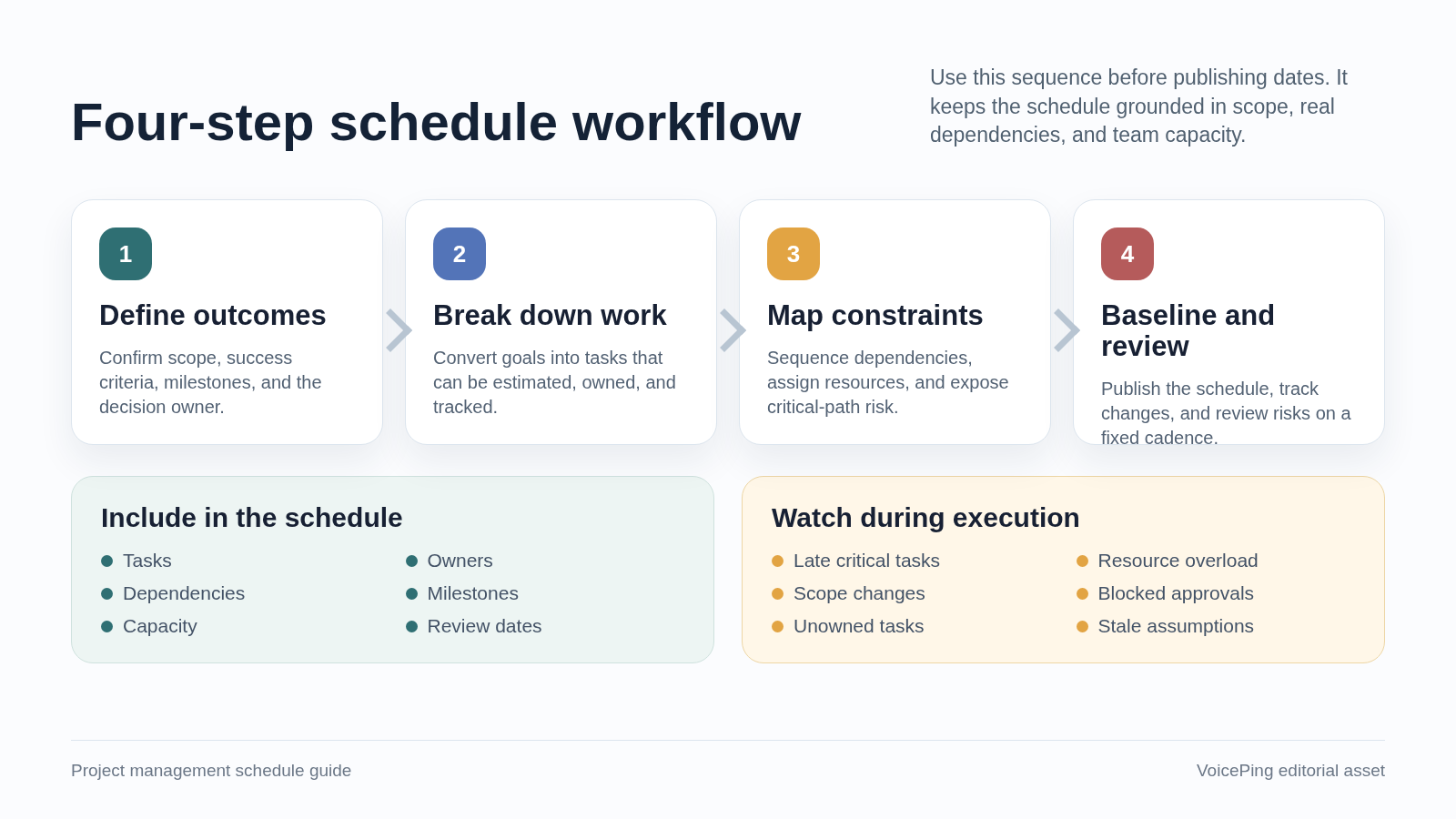
How to Create a Project Management Schedule
1. Define the Outcome and Constraints
Start with the result the project must deliver. Clarify scope, success criteria, budget limits, required quality level, launch window, and any fixed commitments.
Before scheduling tasks, answer:
- What must be delivered?
- What is outside scope?
- Which dates are fixed?
- Who approves scope, budget, and delivery?
- What tradeoffs are acceptable if something changes?
2. Break Work Into Tasks
Break the project into work packages that can be estimated and assigned. A work breakdown structure is useful here because it turns a large goal into smaller tasks that are easier to manage.
Each task should be clear enough that an owner can answer:
- What output is expected?
- What does “done” mean?
- Who needs to review or approve it?
- What information is needed before work can start?
3. Map Dependencies
Dependencies show how tasks relate to each other. Atlassian’s dependency guide outlines common dependency types, including finish-to-start, start-to-start, finish-to-finish, and start-to-finish relationships.
Most teams can start with simple dependency questions:
- Which tasks must finish before another can begin?
- Which tasks can happen in parallel?
- Which approvals could block later work?
- Which external vendors, customers, or departments control a dependency?
Microsoft also notes that task dependencies drive schedule changes , so updating a predecessor task can affect successor tasks and the project timeline.
4. Estimate Duration and Effort
Estimate how long each task will take and how much effort it needs. Duration and effort are related but not identical. A task might require four hours of effort but take three business days because the owner is waiting for review or has other work.
Use historical data when possible. If the work is new, document assumptions and review them as the project progresses.
5. Assign Owners and Resources
Assign an owner to each task. Then check whether the schedule is realistic against available capacity, budget, equipment, and specialist skills.
Avoid assigning people at 100% capacity across the entire project. A schedule with no buffer is fragile because normal work includes meetings, support requests, rework, sick days, and urgent interruptions.
6. Build the Timeline and Critical Path
Once tasks, dependencies, duration, and owners are defined, build the timeline. A Gantt chart, timeline view, spreadsheet, or project management tool can work depending on project complexity.
Identify the critical path: the chain of tasks that controls the project finish date. If a critical-path task slips, the overall delivery date is at risk. Microsoft recommends regularly checking the critical path because it can change as work progresses.
7. Save a Baseline
When stakeholders approve the schedule, save a baseline. The baseline is the reference version used to compare planned dates against actual progress.
Do not treat the baseline as a promise that nothing will change. Treat it as a decision record. When dates, scope, or resources change, the team can see what changed and why.
8. Review and Update the Schedule
A schedule is only useful if it stays current. Review it on a predictable cadence and update it when risks, dependencies, or priorities change.
For many teams, a weekly schedule review is enough. High-risk launches or customer-facing deadlines may need more frequent review.
Project Schedule Best Practices
Keep the Schedule Connected to Decisions
Every schedule update should support a decision: change priority, remove a blocker, adjust resources, notify stakeholders, or accept a tradeoff. Avoid collecting status updates that do not change any action.
Make Dependencies Visible
Hidden dependencies are one of the most common causes of schedule drift. Put dependencies in the schedule and assign owners for external approvals, vendor deliverables, customer feedback, and cross-team handoffs.
Watch Resource Loading
A schedule can look realistic on paper while overloading a few key people. Check who owns the most critical work and whether they have enough capacity to complete it.
Use Buffers Deliberately
Buffers are useful when they protect risky work or review cycles. They are not useful when they hide weak estimates. Label buffers clearly so the team understands what risk they are covering.
Separate the Roadmap, Backlog, and Schedule
The roadmap shows direction. The backlog stores possible work. The schedule commits to sequenced delivery. Mixing all three can make the schedule noisy and hard to maintain.
Use the Right Tool for the Project
A small project may only need a spreadsheet or a shared timeline. A complex project may need scheduling software, resource management, and portfolio reporting.
If your team uses Microsoft tools, note that Microsoft says Project for the web will become Microsoft Planner , so verify your organization’s current Planner and Project rollout before building a long-term workflow around one interface.
How VoicePing Supports Project Schedule Execution
VoicePing is not a replacement for a dedicated Gantt chart or portfolio planning tool. It supports the communication layer around the schedule, especially for remote and hybrid teams.
VoicePing’s virtual office product page describes features such as instant team communication, transcription, voice translation, collaboration tools, guest invitation, cloud recording, custom objects, multiple floors, time tracking, workspace settings, and event logs. These features help project managers keep schedule-related conversations and meeting records easier to access.
Use VoicePing when your schedule depends on:
- Quick conversations to unblock work
- Remote team visibility without constant status meetings
- Meeting transcripts and summaries for decision records
- Collaboration spaces for distributed teams
- Multilingual communication across locations
The practical workflow is simple: keep the formal schedule in your planning tool, then use VoicePing for the conversations, meeting records, and team coordination that keep the schedule moving.
Common Project Schedule Mistakes
Starting With Dates Before Scope Is Clear
Dates are not meaningful until scope, ownership, and assumptions are clear. If stakeholders want a deadline first, mark the schedule as a target schedule until estimates are reviewed.
Treating the Schedule as a Static Document
Schedules change as the project changes. The problem is not change itself; the problem is unmanaged change that never reaches the schedule.
Ignoring Review and Approval Time
Many schedules estimate production work but forget reviews, legal checks, procurement, customer approvals, or executive decisions. Add those steps explicitly.
Overloading Specialists
Specialists often sit on the critical path because many tasks depend on them. Check their capacity early and avoid assigning every urgent task to the same person.
Tracking Too Much Detail
A detailed schedule is useful only when the detail supports action. If the schedule is too hard to maintain, people stop trusting it.
Project Management Schedule FAQ
What is the difference between a project plan and a project schedule?
A project plan explains the overall approach, scope, stakeholders, risks, communication, and governance. A project schedule is the time-based execution view: tasks, owners, dependencies, dates, and milestones.
What is the difference between a roadmap and a schedule?
A roadmap shows strategic direction and major phases. A schedule shows the ordered work required to deliver those phases.
How often should a project schedule be updated?
Update it whenever a change affects tasks, dates, owners, dependencies, scope, or resources. For most active projects, review it at least weekly.
What is the critical path in project scheduling?
The critical path is the sequence of linked tasks that controls the project finish date. If a critical-path task is delayed, the project finish date is usually delayed unless the team changes scope, resources, or sequencing.
What is the best project schedule tool?
The best tool depends on project complexity. Simple projects can use spreadsheets or shared timelines. Complex projects usually need task dependencies, resource visibility, baseline tracking, and reporting. Remote teams also need reliable communication and meeting records around the schedule.
Related Reading
- What Is a Project Roadmap? Tips for Building an Effective One
- What Is a Project Lead? Role, Responsibilities, and Strategies
- Role and Responsibility of Project Managers: A Complete Guide
- What Is Micromanaging? 3 Ways to Avoid Micromanagement