In this article
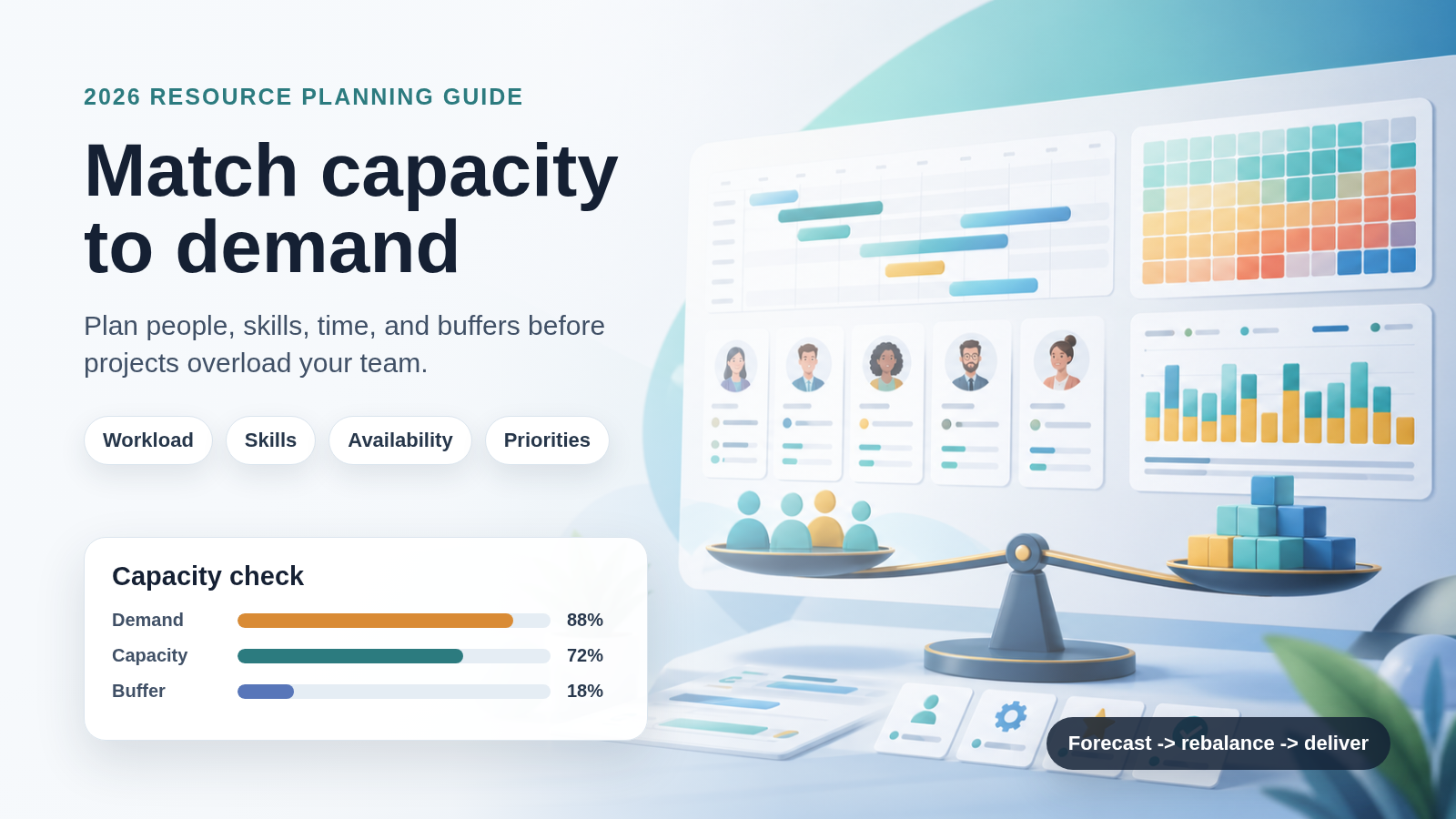
Learn how resource capacity planning helps project managers balance demand, availability, skills, workload, and buffers before teams become overloaded.
Last updated: April 26, 2026. This guide was refreshed with current resource planning, capacity planning, and VoicePing documentation sources. Pricing and feature availability change often, so verify vendor pages before purchasing a tool.
Resource capacity planning helps project managers answer a simple but difficult question: can the team realistically deliver the work that is being requested?
It compares project demand with available people, skills, time, budget, and buffers. Done well, it prevents teams from accepting too much work, exposing bottlenecks only after deadlines are already at risk, or solving every capacity problem with last-minute outsourcing.
What Is Resource Capacity Planning?
Resource capacity planning is the process of forecasting project demand and comparing it with the capacity available to deliver that work. In project teams, capacity usually means available people, hours, skills, budget, equipment, and specialist availability.
Atlassian’s capacity planning guide defines the work as matching demand, such as projects and requests, with supply, such as team time, skills, and energy. That framing is useful because capacity is not just a headcount number. A team can have enough people and still lack the right skills, time zone coverage, review availability, or decision support.
Resource capacity planning is most useful before a project starts, but it should continue during execution. Capacity changes when scope expands, priorities shift, people take time off, urgent operational work appears, or a critical specialist becomes unavailable.
Resource Planning vs. Capacity Planning
The two terms are related, but they are not identical.
| Term | Main question | Typical output |
|---|---|---|
| Resource planning | What resources does the project need, and how should they be allocated? | Resource plan, assignments, equipment, budget, tools |
| Capacity planning | Can available capacity meet current and future demand? | Capacity forecast, gap analysis, hiring or rebalancing decision |
| Resource scheduling | When are resources needed and available? | Resource calendar, schedule, booking view |
| Capacity management | How do we monitor and adjust capacity over time? | Ongoing utilization, workload, and demand management |
Atlassian’s resource planning guide groups resources into people, budget, tools/software, equipment, and space. Atlassian’s resource scheduling guide frames scheduling around three practical questions: what resources the project needs, when it needs them, and whether they are available.
Why Resource Capacity Planning Matters
It Prevents Overcommitment
Teams often say yes to work before checking realistic availability. Capacity planning forces the project manager to compare demand with available capacity before committing to dates.
It Reduces Burnout Risk
An overloaded team may still deliver for a short time, but quality, morale, and retention suffer. Capacity planning helps managers see overload early enough to reduce scope, change priorities, add help, or move dates.
It Protects Priority Work
When demand exceeds capacity, not every project should receive equal attention. Capacity planning makes tradeoffs visible so leaders can protect high-value work and pause lower-priority requests.
It Improves Budget Control
Hiring, contractors, overtime, and vendor work all affect cost. A capacity forecast helps managers decide whether extra capacity is truly needed or whether the plan should be rebalanced first.
It Makes Bottlenecks Visible
Some projects depend on a small number of specialists, reviewers, or decision makers. Capacity planning identifies those bottlenecks before they become schedule delays.
How to Build a Resource Capacity Plan
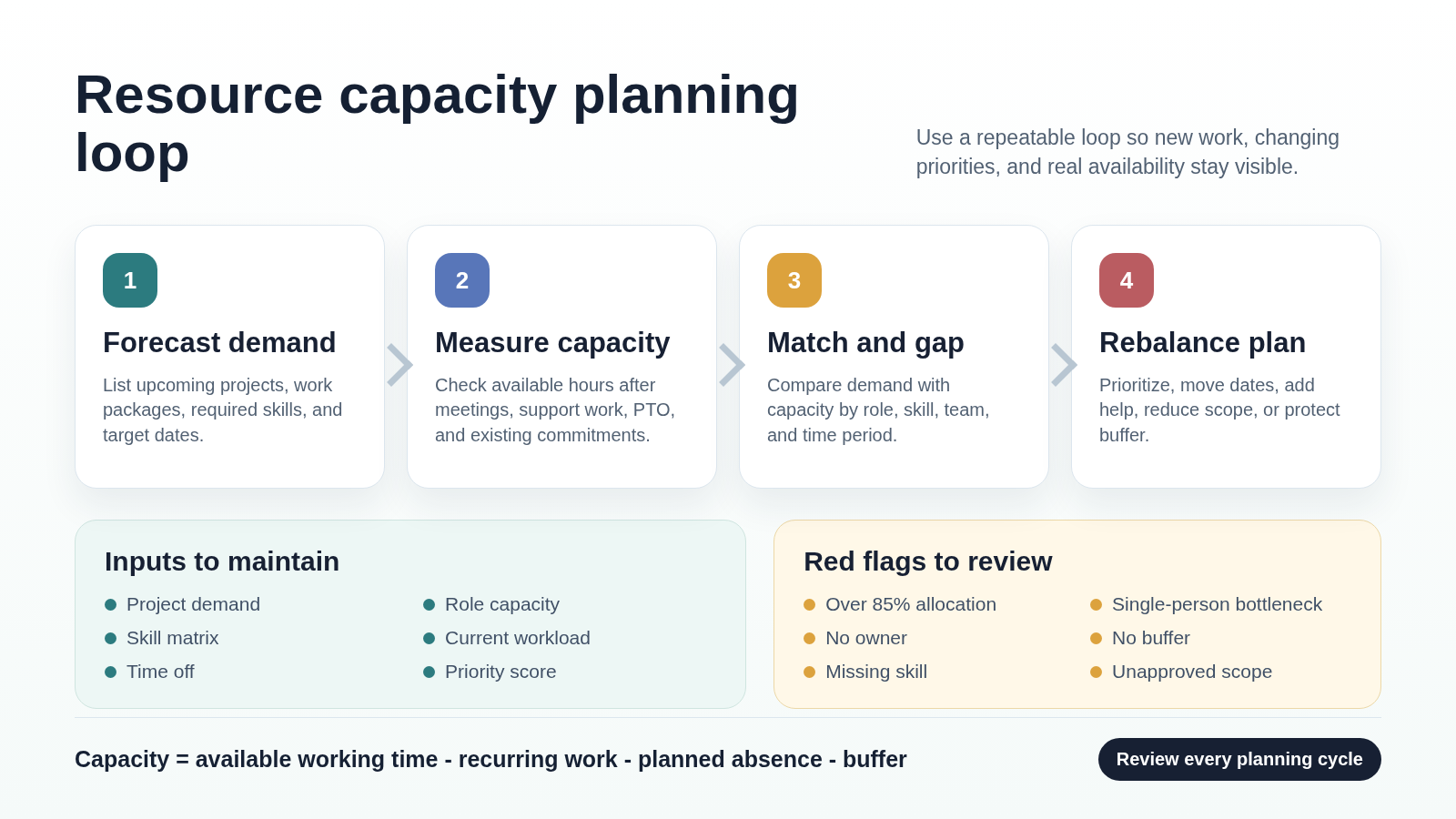
1. Forecast Project Demand
List the work that is already committed and the work that is likely to arrive. Include active projects, upcoming projects, support work, maintenance, client requests, internal initiatives, and recurring responsibilities.
For each work item, record:
- Expected outcome
- Target date or planning window
- Required roles and skills
- Estimated effort
- Dependencies and approval points
- Priority or business value
2. Measure Real Capacity
Do not calculate capacity from a theoretical 40-hour week. Start from actual availability.
Subtract meetings, recurring operational work, support rotations, planned leave, onboarding, training, review time, and a risk buffer. If the team is distributed, also consider time zone overlap and handoff delays.
A simple planning formula is:
capacity = available working time - recurring work - planned absence - buffer
3. Compare Demand With Capacity
Match demand and capacity by time period, role, skill, and team. A single total capacity number can hide serious gaps. For example, a team may have enough total hours but not enough backend engineering, legal review, design, QA, or language support.
Look for:
- Roles or skills with more demand than capacity
- People allocated across too many projects
- Projects dependent on one person
- Work without a clear owner
- Critical tasks with no buffer
4. Rebalance the Plan
When demand exceeds capacity, the answer is not always to hire. First decide which tradeoff is most appropriate:
- Move lower-priority work
- Reduce scope
- Add a contractor or specialist
- Cross-train another team member
- Change the delivery date
- Split work into phases
- Remove meetings or low-value recurring work
- Escalate a decision to leadership
Capacity planning is only useful when the organization is willing to act on what the plan reveals.
5. Review Capacity Regularly
Capacity plans become stale quickly. Review capacity during planning cycles and when major changes happen: new projects, scope changes, staffing changes, urgent incidents, delays, or leadership priority shifts.
For fast-moving teams, a weekly capacity review is often enough. For large portfolios or customer-facing launches, review high-risk capacity more often.
Capacity Planning Metrics to Track
| Metric | What it tells you |
|---|---|
| Planned utilization | How much available capacity is already allocated |
| Demand by role | Which roles or skills are under the most pressure |
| Capacity gap | The difference between required capacity and available capacity |
| Allocation by person | Whether individuals are overloaded or underused |
| Bottleneck count | How many tasks depend on scarce people or approvals |
| Forecast accuracy | Whether estimates are improving over time |
| Buffer usage | Whether risk buffers are being consumed too early |
Avoid treating utilization as the only goal. A team at 100% allocation has no room for review, learning, incidents, customer escalations, or rework. Sustainable capacity planning usually needs explicit buffer.
Best Practices for Resource Capacity Planning
Use Current Workload Data
Estimates improve when they are compared with actual work. Track enough time, effort, or throughput data to understand how long work really takes, but avoid creating a reporting burden that slows the team down.
Plan by Skill, Not Just Headcount
Two available people are not interchangeable if one has the required specialist knowledge and the other does not. Maintain a simple skills matrix for critical roles.
Prioritize Before Rebalancing
If every project is marked urgent, capacity planning becomes political instead of practical. Use priority, business impact, deadline risk, and customer commitment to decide what gets capacity first.
Include Non-Project Work
Meetings, support, hiring, training, administrative tasks, and incident response all consume real capacity. Leaving them out makes the plan look healthier than it is.
Keep a Buffer
Projects need room for uncertainty. Build buffer for high-risk work, review cycles, handoffs, and external approvals. Label the buffer so it does not quietly become extra scope.
Make Tool Claims Verifiable
Many tools offer resource, workload, or capacity features, but availability can depend on plan level and product version. For example, Asana’s help center says capacity plans give leaders a high-level view of staffing across workstreams, notes that capacity plans and workload are not connected at the moment, and lists capacity planning availability for Enterprise, Enterprise+, and legacy Enterprise tiers.
Before rolling out a tool, verify:
- Whether capacity planning is included in your plan
- Whether workload and capacity views are connected
- Whether allocation uses hours, percentages, story points, or another unit
- Whether exports, APIs, permissions, and privacy controls fit your process
- Whether pricing changes with users, projects, seats, or usage
How VoicePing Supports Capacity Planning Workflows
VoicePing is not a dedicated portfolio capacity planning system. Its value is in the communication and visibility layer around remote and hybrid teams.
VoicePing’s virtual office page currently describes features such as instant team communication, transcription, summarization, voice translation, collaboration tools, guest invitation, cloud recording, custom objects, multiple floors, productivity management, time tracking, workspace feature settings, and event logs.
For resource capacity planning, that can help teams:
- Discuss workload conflicts quickly without scheduling every conversation
- Use meeting transcripts and summaries as decision records
- Keep remote team status and communication context visible
- Track time and project work where that fits the team’s management policy
- Support multilingual teams with transcription and translation
Pricing and included allowances change over time. The VoicePing pricing manual currently says both voice translation and virtual office are included in each plan, but teams should always verify current plan limits, account counts, trial availability, and usage allowances before rollout.
Common Resource Capacity Planning Mistakes
Counting People Instead of Availability
Headcount is not capacity. Capacity depends on available time, skills, workload, meetings, planned absence, and the amount of context switching required.
Ignoring Single-Person Bottlenecks
If one person is required for every approval, deployment, design review, or customer decision, the schedule is vulnerable. Spread knowledge and create backup owners where possible.
Planning at 100% Allocation
Full allocation leaves no room for change. If your plan assumes everyone is fully available all the time, the plan is already fragile.
Using Old Estimates Forever
Estimates should improve as real work is completed. Compare estimated effort with actual effort and update future plans.
Treating Capacity Planning as a Spreadsheet Exercise
The spreadsheet is not the decision. The decision is what the organization will do when demand exceeds capacity.
Resource Capacity Planning FAQ
What is resource capacity planning?
Resource capacity planning is the process of comparing upcoming work demand with available people, skills, time, budget, and other resources so the team can commit to realistic delivery plans.
What is the difference between capacity planning and resource planning?
Capacity planning checks whether available capacity can meet demand. Resource planning decides which specific resources should be assigned to which work.
How often should capacity be reviewed?
Review capacity at least once per planning cycle. Active projects may need weekly review, while large programs or high-risk launches may need more frequent checks.
What is a healthy utilization target?
There is no universal target. A healthy target depends on the type of work, amount of support load, meeting load, risk, and expected change. Avoid 100% allocation for knowledge work because it leaves no room for coordination, learning, rework, or urgent issues.
Do small teams need capacity planning?
Yes, but the format can be lightweight. A small team may only need a simple workload table, skills matrix, and weekly review. The point is not process; the point is avoiding unrealistic commitments.
Related Reading
- Project Management Schedule: How to Build a Practical Plan in 2026
- Role and Responsibility of Project Managers: A Complete Guide
- What Is a Project Lead? Role, Responsibilities, and Strategies
- What Is a Project Roadmap? Tips for Building an Effective One
Sources Checked
- Atlassian: Capacity planning in project management
- Atlassian: Resource planning in project management
- Atlassian: Resource scheduling in project management
- Asana Help Center: Capacity planning
- Asana: Capacity planning feature page
- VoicePing: Virtual Office with Transcription and Voice Translation
- VoicePing Docs: Plans and Pricing